
doc2.0 doc2.0 doc2.0
/
  • Merchant Manual
  • 1. General Account Information
  • 2. Dashboard
  • 3. Orders
  • 4. Reports
    • 4.1. Transaction Report
    • 4.2. Merchant Cashflow Report
    • 4.3. Performance Report
    • 4.4. Merchant Daily Performance Report
    • 4.5. Decline Statistics
  • 5. Tools
    • 5.1. Integration Panel
    • 5.2. Batch Operations
    • 5.3. Black, White And Loyalty Lists
    • 5.4. Online Monitor
    • 5.5. Virtual Terminal
    • 5.6. Transaction Marker Notification
    • 5.7. Transaction Markers
  • 6. Settings
    • 6.1. Settings Search
    • 6.2. Employees
    • 6.3. Projects
    • 6.4. Endpoints
    • 6.5. Master Endpoints
    • 6.6. Endpoint Group
  • 7. Reference
    • 7.1. Glossary
    • 7.2. KPIs Detailed View
    • 7.3. Transaction Statuses And Types
  1. doc2.0 /
  2. 6. Settings /
  3. 6.1. Settings Search
View Source Open in ChatGPT Open in Claude

6.1. Settings Search

The screen is designed to find projects and endpoints by their name or ID and is located in “Settings” – “Settings Search” section.

pic93 merchant faq

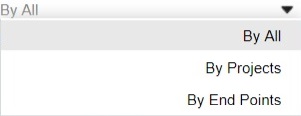
The search range can be specified to endpoints or projects.
pic94 merchant faq
Previous
6. Settings
Next
6.2. Employees

support@payneteasy.com

Powered by Payneteasy